No sign-up · Works in your browser · 100% private

Track time.
Manage money.
Own your data.

The private productivity hub that tracks your hours, income, and expenses — all in your browser. No accounts, no cloud, no subscriptions. Your data never leaves your device.

No sign-up. No download. Works instantly in your browser.

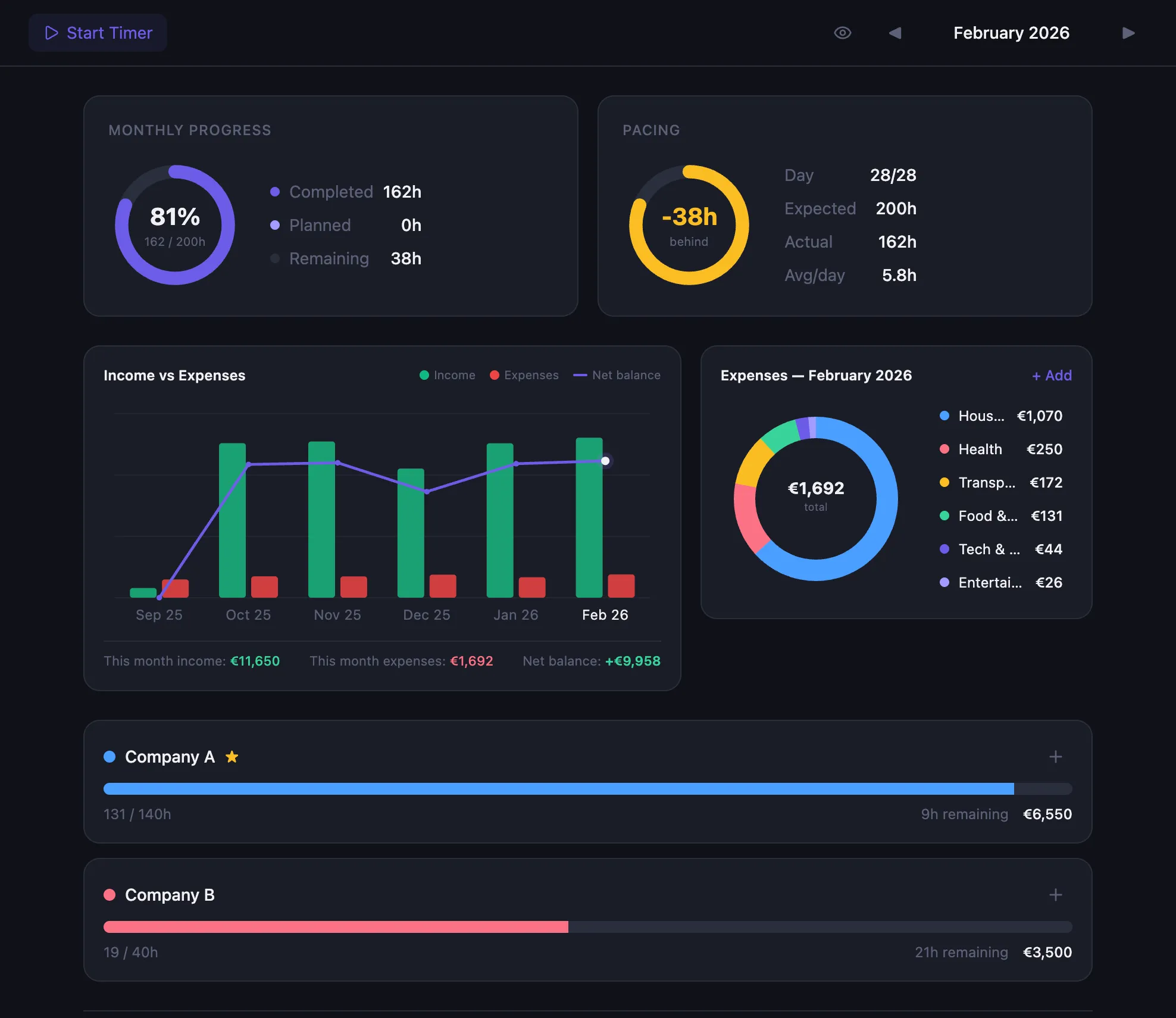
DayTrak Dashboard with income vs expenses

What is DayTrak?

DayTrak is a free, privacy-first productivity app that combines time tracking, income management, and expense tracking in a single workspace that runs entirely in your browser. Unlike cloud-based tools like Toggl, Clockify, or Harvest, DayTrak stores all your data locally using SQLite and CRDTs (via the Evolu framework) — nothing is ever sent to a server. You can track hours across multiple projects with hourly, salary, or hybrid compensation models, create invoices from tracked time entries, manage recurring and one-time income and expenses with category breakdowns, and view your financial health through an interactive dashboard with income vs expenses charts and savings calculations. DayTrak works offline as a Progressive Web App (PWA), supports multi-device sync via an encrypted 24-word recovery phrase, and is available in English and Slovak. It is completely free with no account required — an optional $19 one-time Pro upgrade adds multi-device sync and encrypted cloud backup.

What features does DayTrak include?

Time tracking, income, expenses, and financial insights — all private, all yours.

Time Tracking

Track hours across projects with goals, pacing, and a built-in timer. Daily and monthly pivot tables with 4 data modes.

💰

Income Tracking

Recurring and one-time income. Paid invoices automatically become income. See your earnings trend across months.

💸

Expense Tracking

Track recurring and one-time expenses. Spending trends, category breakdowns, and daily averages at a glance.

📊

Financial Dashboard

Income vs Expenses chart with 6-month history. See your savings, net balance, and where your money goes.

📋

Invoicing & Billing

Create invoices from tracked hours. Track status from draft to paid. Paid invoices flow into your income automatically.

🔒

100% Private

All data stored in your browser. No servers, no accounts, no tracking. Works offline. Encrypted multi-device sync available.

What does DayTrak look like?

Every screen you need to track your time and manage your money.

Pivot Table — Combined view with Time Tracking, Income, and Expenses

Pivot Table — All Mode

See time tracking, income, and expenses in one unified view. Switch between 4 modes with Month/Year scope.

Finance — Expenses view with spending trends

Expense Tracking

Recurring and variable expenses with category breakdown, spending trends, and donut charts.

How do I get started with DayTrak?

1

Open the app

No sign-up. No download. Just open the URL in your browser and start immediately.

2

Set up your world

Add projects with rates and goals. Set up recurring income and expenses. Everything in one place.

3

Track & grow

Log hours, track expenses, watch your savings grow. Create invoices when it's time to bill.

How does DayTrak protect your data?

🔐

Zero-knowledge architecture

We can't see your data even if we wanted to. Everything is encrypted on your device.

🌐

Works offline

No internet required after first load. PWA — install on any device, works like a native app.

🚫

No ads, no tracking, no data collection

Your time and financial data is yours alone. We use cookie-free, privacy-respecting page view analytics only. We don't monetize your information.

📥

Full data portability

Export everything as JSON anytime. Import on another device or browser. Your data is never locked in.

How much does DayTrak cost?

No subscriptions. Pay once, own forever.

Free

$0 forever
  • Unlimited projects & entries
  • Income & expense tracking
  • Financial dashboard & charts
  • Invoicing & billing
  • Pivot table (4 modes)
  • Full backup & restore
  • Works offline
Start Free
PRO

Pro

$19 one-time
  • Everything in Free
  • Multi-device sync
  • Encrypted cloud backup
  • Restore on any device
  • Priority support
  • Lifetime updates
Get Pro — $19

Frequently Asked Questions

Is DayTrak really free? +

Yes, DayTrak is completely free with no limits on projects, entries, income, or expenses. All features including the pivot table, financial dashboard, and invoicing are available at no cost. A Pro plan with multi-device sync is available for a one-time $19 payment.

Do I need to create an account? +

No. DayTrak requires no sign-up, no email, and no password. Just open the app in your browser and start tracking. Your data is stored locally in your browser using IndexedDB.

Where is my data stored? +

All your data is stored locally in your browser. Nothing is sent to any server. DayTrak uses a local-first architecture with SQLite running in the browser via WebAssembly. Your time tracking data, income, expenses, and invoices never leave your device.

Does it work offline? +

Yes. DayTrak is a Progressive Web App (PWA). After the first load, it works completely offline. You can install it on your device and use it like a native app without an internet connection.

Can I use it on multiple devices? +

Yes. DayTrak offers end-to-end encrypted sync using a 24-word recovery phrase. Enter your phrase on another device and your data syncs automatically. The sync relay server only sees encrypted data — it cannot read your information.

What happens if I clear my browser data? +

If you clear your browser data without a backup, your data will be lost. To prevent this, DayTrak offers JSON backup and restore (export everything with one click), multi-device sync via recovery phrase, and PWA installation which provides more persistent storage than a regular browser tab.

Can I track both income and expenses? +

Yes. DayTrak tracks recurring and one-time income and expenses with categories. You can see spending trends, category breakdowns, income vs expenses charts, and your net savings — all in one dashboard. Paid invoices automatically become income.

Built by

Jakub Rodák

Software engineer who got tired of sharing financial data with cloud-based time trackers. Built DayTrak as a privacy-first alternative that keeps everything on your device.

Ready to take control of your time and money?

Track time, manage finances, own your data. Free forever.

Get Started — Free